GIF to Sprite Sheet & Sprite Sheet Cropping: Complete Guide
Sprite sheets are an essential tool for game developers, allowing efficient organization and rendering of animation frames. PolishSprite makes it easy to convert GIFs to sprite sheets and crop existing sprite sheets with precision. This guide covers both processes comprehensively.
Converting GIF to Sprite Sheet
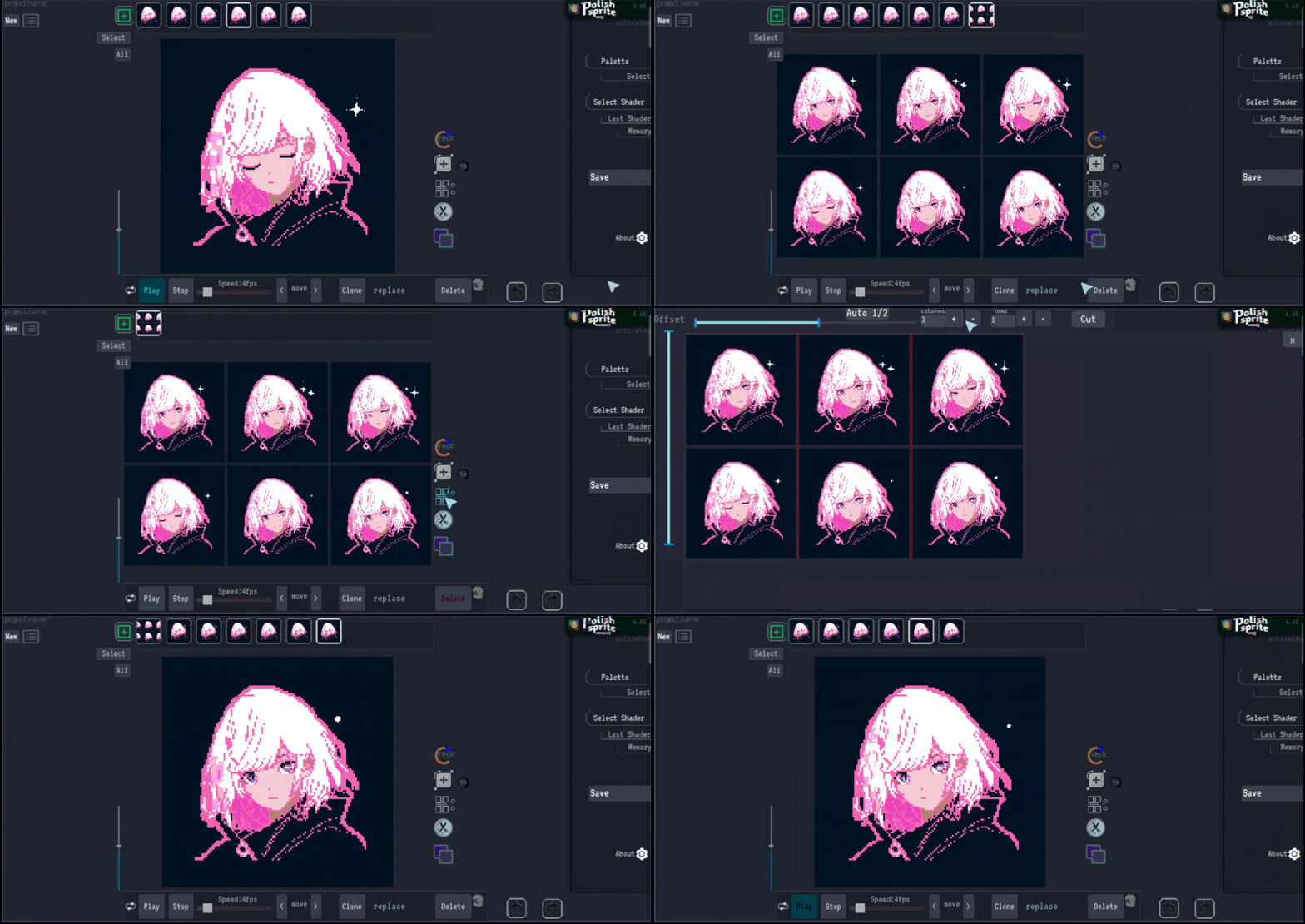
Converting an animated GIF to a sprite sheet is straightforward with PolishSprite. The process packs all frames of your animation into a single, optimized image that can be efficiently used in your game engine. Here's how:
- Load your GIF: Start by uploading the animated GIF you want to convert.
- Initiate conversion: Click "Save as Sprite Sheet" from the available options.
- Set rows: Specify the number of rows for your sprite sheet layout.
- Complete conversion: Your sprite sheet will be generated and ready for download.
Cropping Existing Sprite Sheets
If you have a sprite sheet that needs precise frame extraction, PolishSprite offers powerful cropping tools. This is especially useful when dealing with sprite sheets that don't have perfectly aligned frames or were generated automatically. Here's the process:
- Upload your sprite sheet: Start by uploading the sprite sheet image you want to crop.
- Open cropping function: Locate and open the "Crop Sprite Sheet" function (positioned above "Remove Background").
- Adjust guide lines: Use the top and left sliders to position the red guide lines where you want the cropping boundaries.
- Set grid dimensions: Enter the number of columns and rows to define your frame grid.
- Confirm alignment: Check that the red lines align correctly with your intended frame boundaries.
- Cut frames: Click "Cut" to extract the individual frames.
Key Advantages of PolishSprite's Cropping Tool
PolishSprite's cropping tool provides a unique advantage over standard cropping solutions:
- Manual correction: It allows you to manually fix imperfect sprite sheets (such as AI-generated ones with slight alignment issues).
- Fine-tuning options: Use the Move/Size/Rotate function to adjust individual frame positioning after cropping.
- Precision controls: Visual guide lines help ensure accurate frame extraction.
- Flexible layout: Customize the number of rows and columns to match your game's requirements.
Best Practices for Sprite Sheets
When working with sprite sheets in PolishSprite:
- Keep frame sizes consistent for easier implementation in game engines
- Consider your target platform's texture size limitations
- Organize frames in logical sequences that match your animation needs
- Use the preview feature to verify that all frames are properly aligned before finalizing
- For game development, consider padding between frames to avoid texture bleeding issues
Advanced Tip
Want to master PolishSprite? Check out our separate blog post on Move/Size/Rotate to leverage its unique features for further frame refinement after cropping!
Convert Your GIFs to Sprite Sheets
Ready to optimize your game assets? Upload your GIF or sprite sheet to PolishSprite and start converting today.
Create Sprite Sheets Now